Daily no-fluff issues that help you succeed and stay relevant in DS/ML roles.
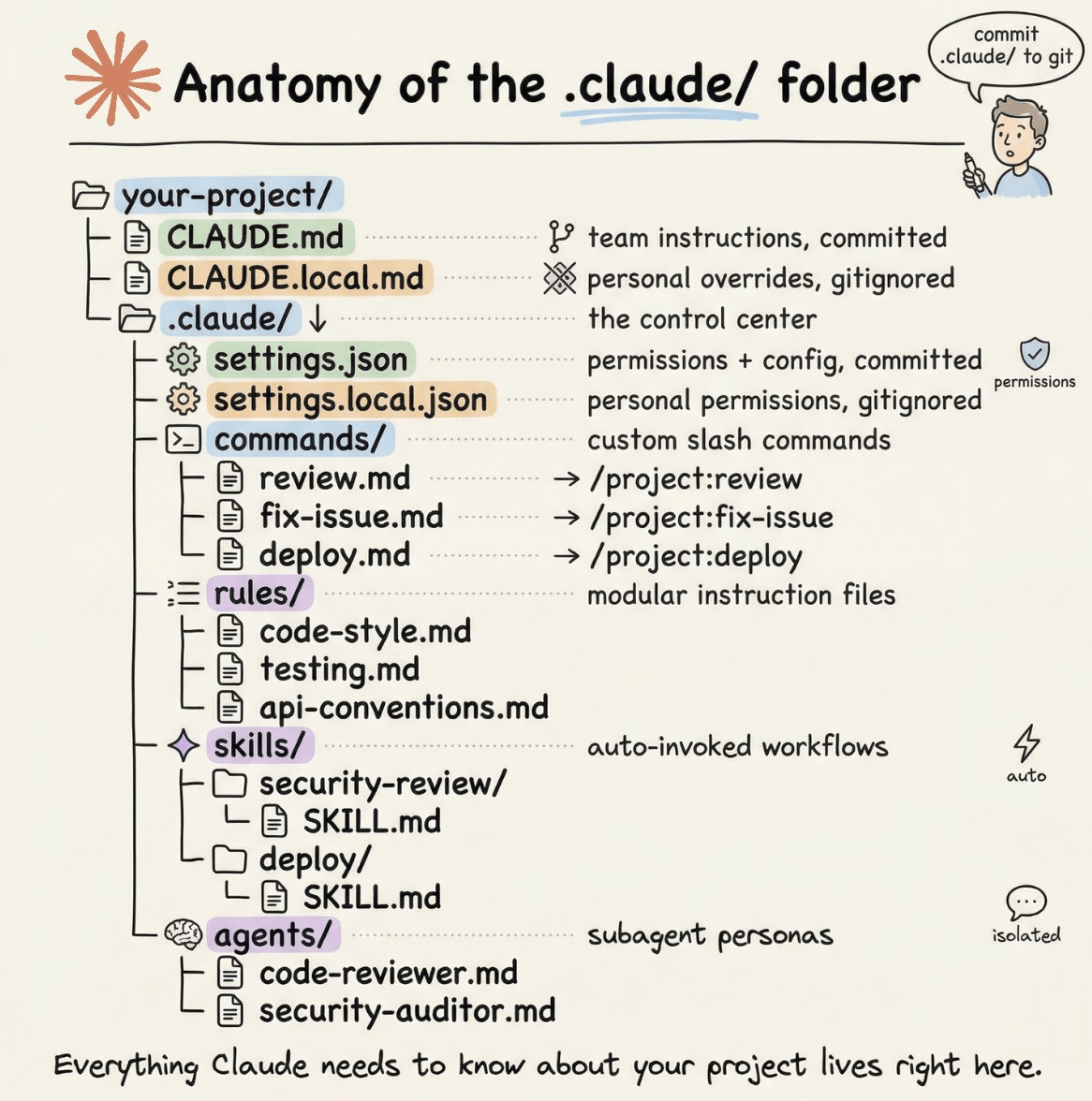
Anatomy of the .claude/ Folder
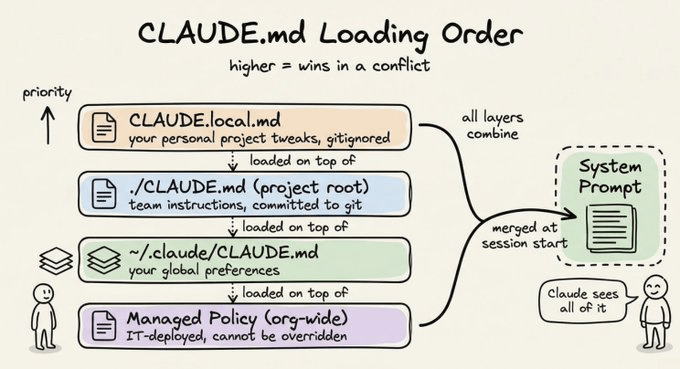
That’s ~20 lines. It gives Claude everything it needs to work productively in this codebase without constant clarification. CLAUDE.local.md for personal overridesSometimes you have a preference that’s specific to you, not the whole team. Maybe you prefer a different test runner, or you want Claude to always open files using a specific pattern. Create
The rules/ folder: modular instructions that scale
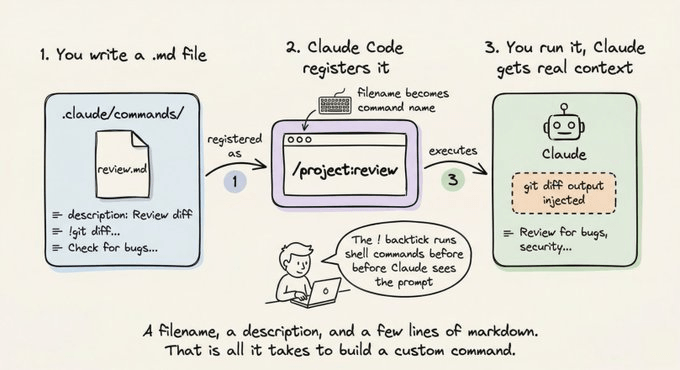
The Every markdown file inside Each file stays focused and easy to update. The team member who owns API conventions edits The real power comes from path-scoped rules. Add a YAML frontmatter block to a rule file and it only activates when Claude is working with matching files: Claude won’t load this file when editing a React component. It only loads when it’s working inside src/api/ or src/handlers/. Rules without a paths field load unconditionally, every session. This is the right pattern once your The commands/ folder: your custom slash commandsOut of the box, Claude Code has built-in slash commands like Every markdown file you drop into A file named
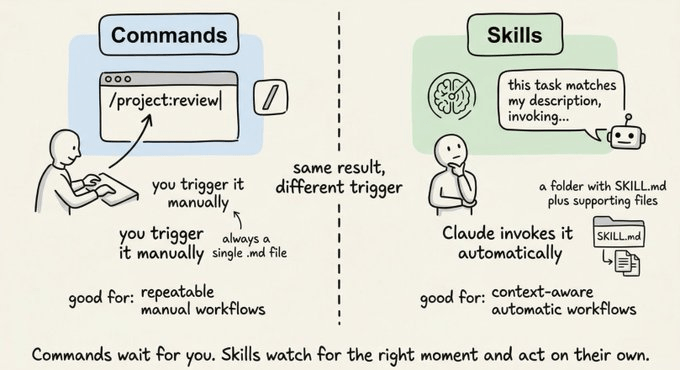
Here’s a simple example. Create Now run Passing arguments to commandsUse Running Personal vs. project commandsProject commands in A useful personal command: a daily standup helper, a command for generating commit messages following your convention, or a quick security scan. The skills/ folder: reusable workflows on demandYou now know how commands work. Skills look similar on the surface, but the trigger is fundamentally different. Here’s the distinction before we go any further:
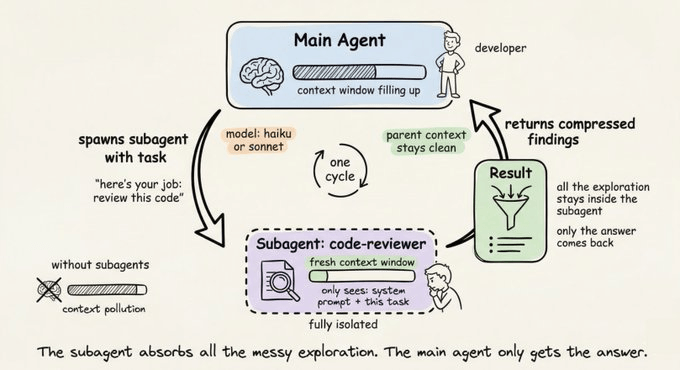
Skills are workflows that Claude can invoke on its own, without you typing a slash command, when the task matches the skill’s description. Commands wait for you. Skills watch the conversation and act when the moment is right. Each skill lives in its own subdirectory with a The When you say “review this PR for security issues,” Claude reads the description, recognizes it matches, and invokes the skill automatically. You can also call it explicitly with The key difference from commands: skills can bundle supporting files alongside them. The Personal skills go in The agents/ folder: specialized subagent personasWhen a task is complex enough to benefit from a dedicated specialist, you can define a subagent persona in Here’s what a When Claude needs a code review done, it spawns this agent in its own isolated context window. The agent does its work, compresses the findings, and reports back. Your main session doesn’t get cluttered with thousands of tokens of intermediate exploration. The tools field restricts what the agent can do. A security auditor only needs Read, Grep, and Glob. It has no business writing files. That restriction is intentional and worth being explicit about. The model field lets you use a cheaper, faster model for focused tasks. Haiku handles most read-only exploration well. Save Sonnet and Opus for the work that actually needs them. Personal agents go in
settings.json: permissions and project configThe The complete file looks like this: Here’s what each part does. The The allow list contains commands that run without Claude asking for confirmation. For most projects, a good allow list covers:
The deny list contains commands that are blocked entirely, no matter what. A sensible deny list blocks:
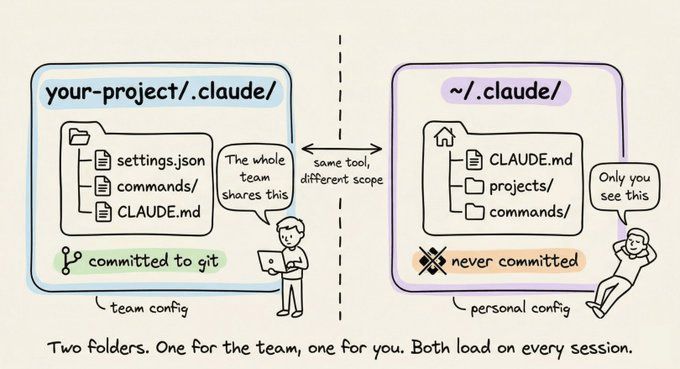
If something isn’t in either list, Claude asks before proceeding. That middle ground is intentional. It gives you a safety net without having to anticipate every possible command upfront. That said, you can also have The global ~/.claude/ folderYou don’t interact with this folder often, but it’s useful to know what’s in it.
You generally don’t need to manually manage these. But knowing they exist is handy when Claude seems to “remember” something you never told it, or when you want to wipe a project’s auto-memory and start fresh. The full pictureHere’s how everything comes together: A practical setup to get startedIf you’re starting from scratch, here’s a progression that works well. Step 1. Run Step 2. Add Step 3. Create one or two commands for the workflows you do most. Code review and issue fixing are good starting points. Step 4. As your project grows and your CLAUDE.md gets crowded, start splitting instructions into Step 5. Add a That’s genuinely all you need for 95% of projects. Skills and agents come in when you have recurring complex workflows worth packaging up. The key insightThe
Start small, refine as you go, and treat it like any other piece of infrastructure in your project: something that pays dividends every day once it’s set up properly.
|
|
Daily Dose of Data Science
Daily no-fluff issues that help you succeed and stay relevant in DS/ML roles.
Master Full-stack AI Engineering In today's newsletter: An Open-Source Autonomous BI Agent. A Memory-efficient technique to train large models. Types of memory in AI Agents. TODAY'S ISSUE Open-source An Open-Source Autonomous BI Agent MindsDB just open-sourced Anton, an autonomous BI agent that turns plain-language questions into full dashboards. You ask something like “Show me NVIDIA’s profit margins,” and Anton handles everything: figuring out the right data source, writing and executing...
Master full-stack AI Engineering In today's newsletter: DailyDoseofDS is now on Instagram! MCP & Skills for AI agents. [Hands-on] Building an open NotebookLM clone! TODAY'S ISSUE AI engineering DailyDoseofDS is now on Instagram! This newsletter regularly breaks down RAG architectures, AI agents, LLM internals, and everything in between. Now we’re bringing all of that to Instagram too, in a format that’s quick to consume and hard to ignore. We’re already 240 posts deep with content on RAG vs...
Master Full-stack AI Engineering In today's newsletter: Web version of our MCP Guidebook is now live [FREE]! MCP vs Traditional API Architecture Scale ML Models to Billions of Parameters. TODAY'S ISSUE update Web version of our MCP Guidebook is now live [FREE]! Our four guidebooks (MCP, Agents, DS, and AI Engineering) were only accessible in PDF format so far, which made it difficult for us to update and re-distribute them to you. To fix this, we have started rolling them out in web versions...