This newsletter regularly breaks down RAG architectures, AI agents, LLM internals, and everything in between.
Now we’re bringing all of that to Instagram too, in a format that’s quick to consume and hard to ignore.
We’re already 240 posts deep with content on RAG vs HyDE, agentic RAG, specialized AI models, prompt techniques, Bayesian optimization, active learning, and a lot more.
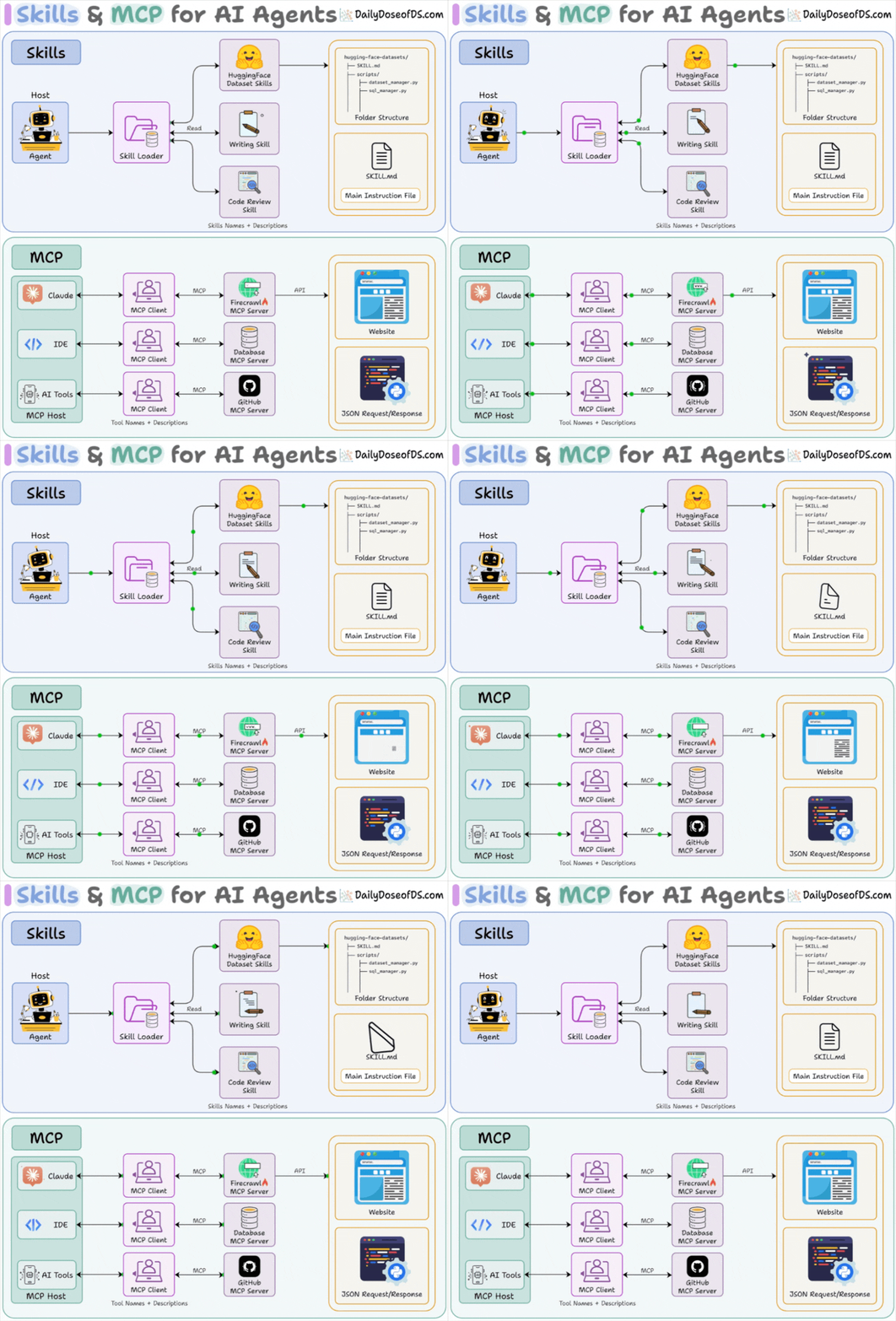
Conflating them is one of the most common mistakes we see when people start building AI agents seriously.
This visual explains how they work under the hood!
Let’s break both down from scratch!
We covered all these details (with implementations) in the MCP course.
It covers fundamentals, architecture, context management, JSON-RPC communication, building a fully custom and local MCP client, tools, resources, and prompts, Sampling, Testing, Security and sandboxing in MCP, integration with most widely used Agentic frameworks like LangGraph, LlamaIndex, CrewAI, and PydanticAI, and more.
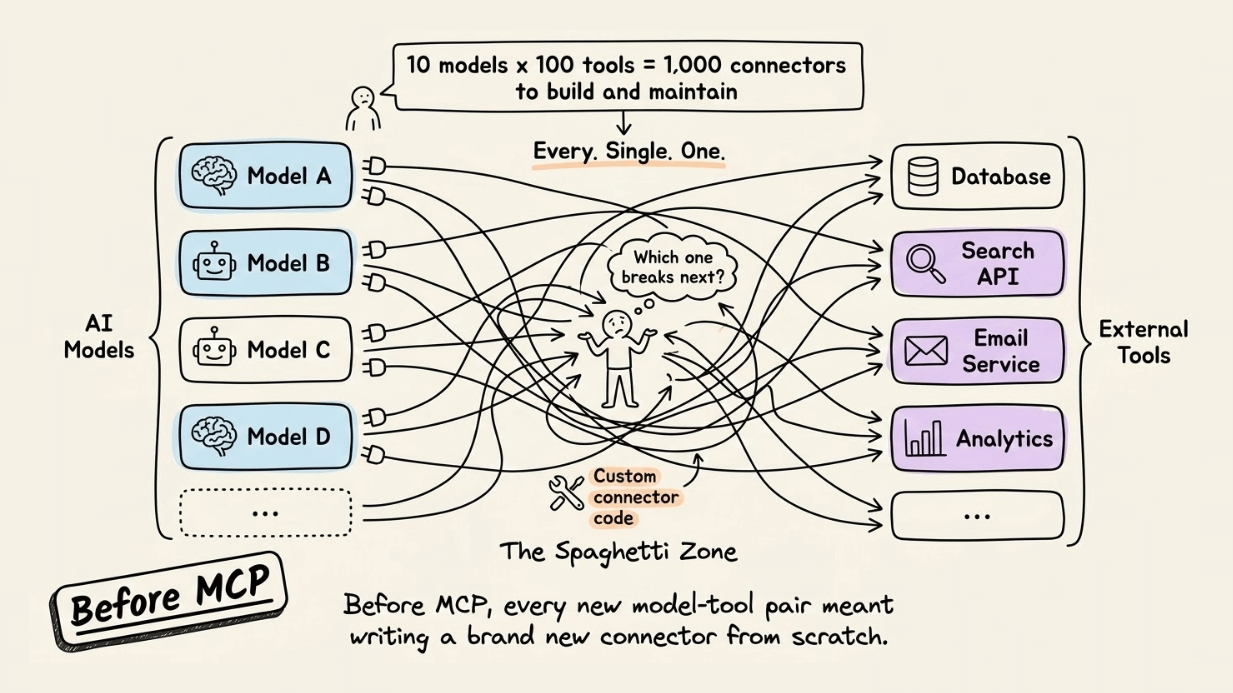
Before MCP existed, connecting an AI model to an external tool meant writing custom integration code every single time.
For instance, 10 models and 100 tools led to 1,000 unique connectors to build and maintain.
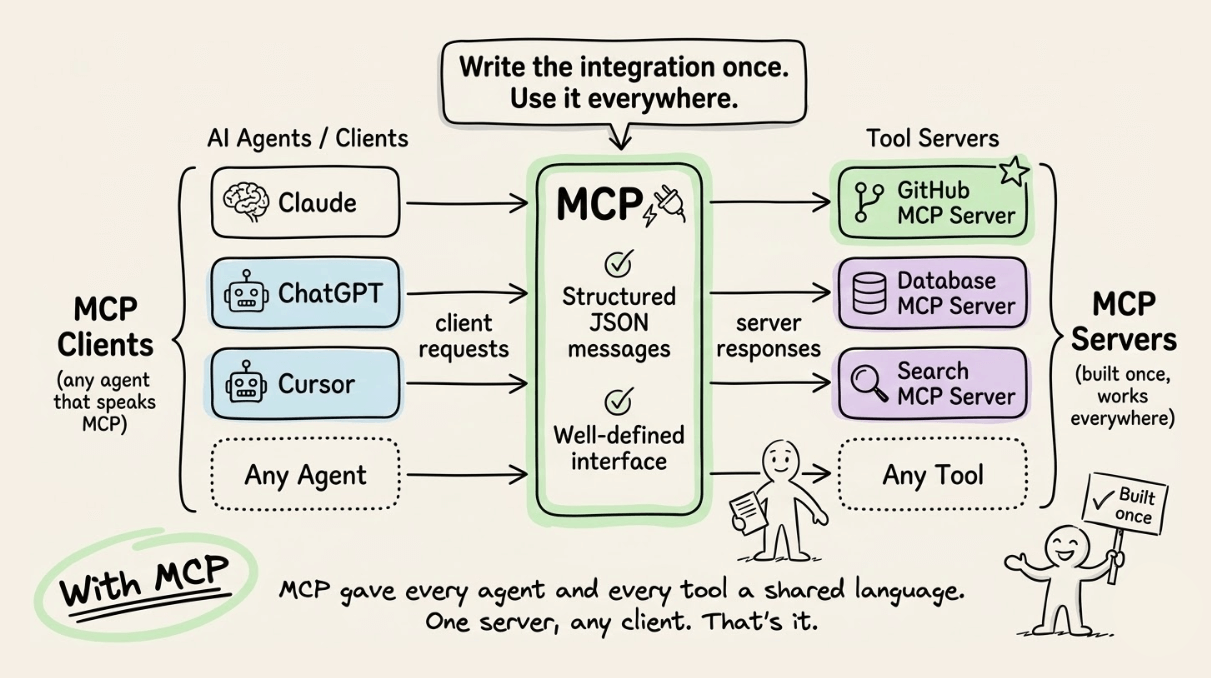
MCP fixed this with a shared communication standard.
Every tool became a “server” that exposed its capabilities. Every AI agent became a “client” that knew how to ask. They talked through structured JSON messages over a clean, well-defined interface.
For instance, one could build a GitHub MCP server once, and it worked with Claude, ChatGPT, Cursor, or any other agent that spoke MCP. That’s the core value: write the integration once, use it everywhere.
But here’s where most explanations stop short.
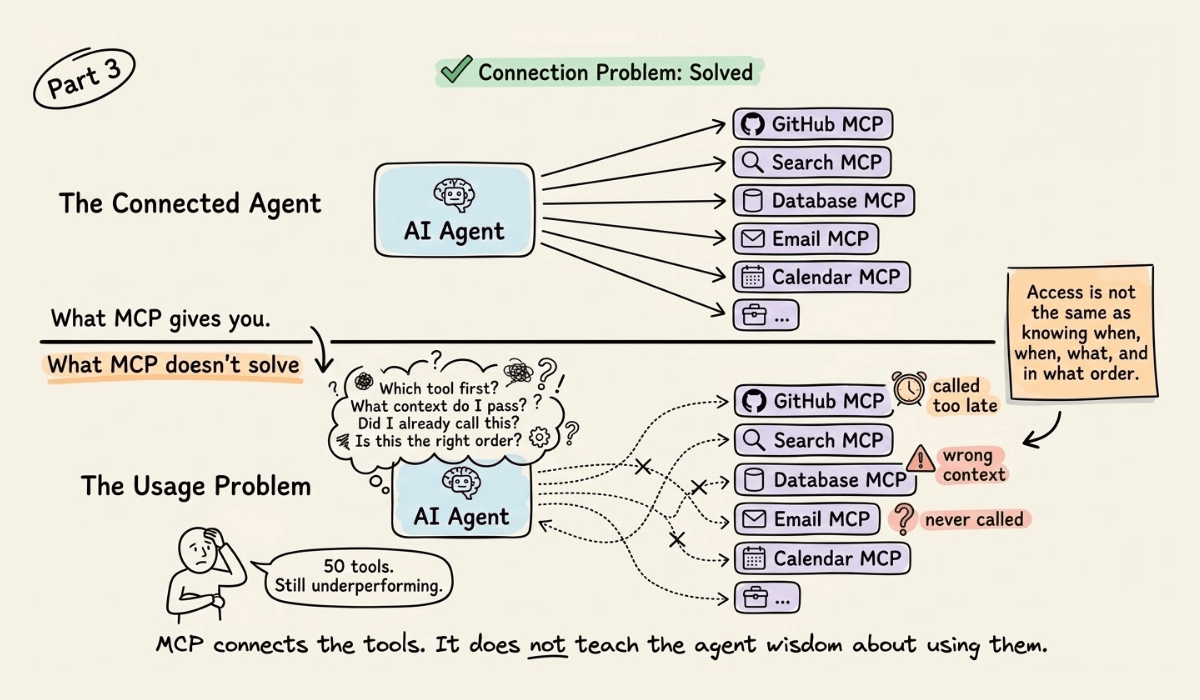
MCP solved the connection problem. But it did not solve the usage problem.
This means you can hand an agent 50 perfectly wired MCP tools, and it can still underperform if it doesn’t know when to call which tool, in what order, and with what context.
That’s the gap Skill intends to fill.
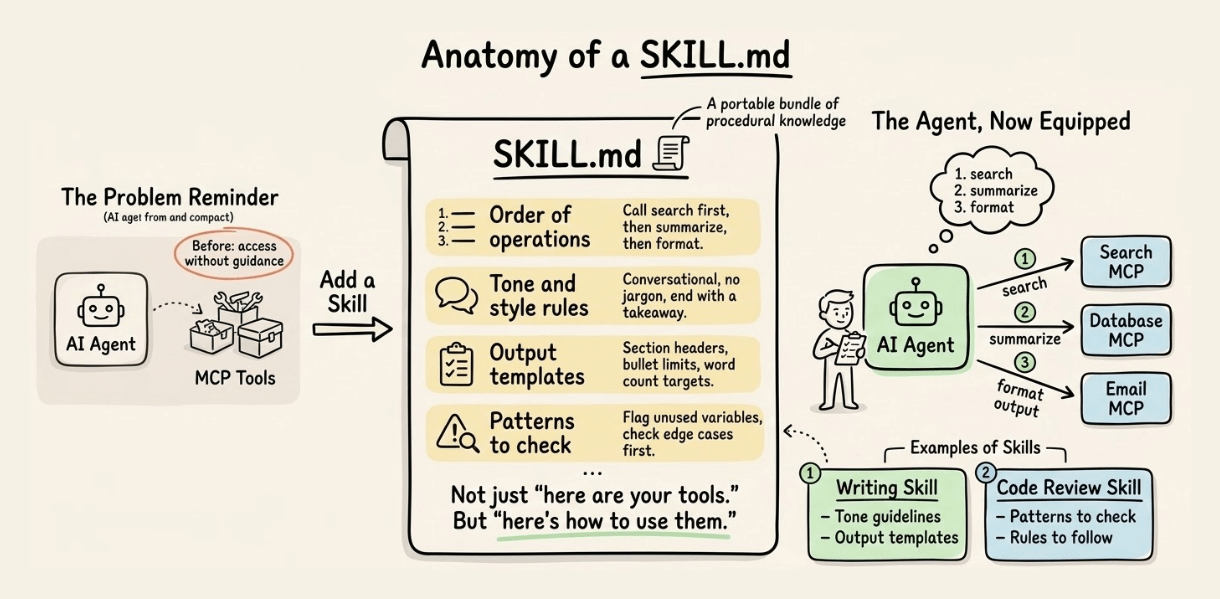
A Skill is a portable bundle of procedural knowledge. Think of a SKILL.md file that tells an agent not just “here are your tools” but “here’s how to use them for this specific task.” A writing skill bundles tone guidelines and output templates. A code review skill bundles patterns to check and rules to follow.
MCP gives the agent a hand. Skills give it muscle memory.
Together, they form the full capability stack for a production AI agent:
MCP handles tool connectivity (the wiring layer)
Skills handle task execution (the knowledge layer)
The agent orchestrates both using its context and reasoning
This is why advanced agent setups increasingly ship both: MCP servers for integrations and SKILL.md files for domain expertise.
If you’re building with agents, skills.sh is a repository of 85k+ skills that you can use with any agent.
Also, we covered all these details (with implementations) in the MCP course.
The reason for us to do this is not to reinvent the wheel but to explain how one of the most powerful tools for learning and research actually works under the hood.
The idea is to replicate this as closely as possible using some popular and open-source tools!
Here's the full video walkthrough:
So by the end of this video, you'll learn:
How to process multimodal data, including text, audio, video, website URLs, and even YouTube videos, into a format ready for use with LLMs.
How to store that data in a vector database for faster search and retrieval.
On top of it, add a memory layer to remember conversations and preferences, giving a more personalized user experience.
And finally, you can either chat with it or generate a podcast from this knowledge using a fully open-source, locally running text-to-speech model.
The code is available in this Studio: Build your own NotebookLM. You can run it without any installations by reproducing our environment below:
All these resources will help you cultivate key skills that businesses and companies care about the most.
Partner with US
ADVERTISE TO 950k+ AI Professionals
Our newsletter puts your products and services directly in front of an audience that matters—thousands of leaders, senior data scientists, machine learning engineers, data analysts, etc., around the world.
Get in touch today by replying to this email.
Today’s email was brought to you by Avi Chawla and Akshay Pachaar.
Advertise | Industry ML guides Before we begin... Today, we have started sending this newsletter from a new platform. If this email landed in your Spam or Promotions folder, please move it to your 'Primary' inbox. Here's how: Gmail on your phone: Tap the 3 dots at the top right corner, click ‘Move to’ then ‘Primary.’ Gmail on your computer: Back out of this email, then drag and drop this email into the ‘Primary’ tab near the top left of your screen. Apple Mail: Tap on our email address at the...
Advertise | Industry-ML guides TOGETHER WITH ASSEMBLYAI Speech-to-text at unmatched accuracy with AssemblyAI AssemblyAI has made it much easier to distinguish speakers and determine what they spoke in a conversation, resulting in: 13% more accurate transcript than previous versions. 85.4% reduction in speaker count errors. 5 new languages (total 16 supported languages). A demo is shown below. First, import the package, set the API key, and transcribe the file while setting speaker_labels...
Data Science PDF | Advertise | Deep dives TOGETHER WITH ASSEMBLYAI Speech-to-text at unmatched accuracy with AssemblyAI AssemblyAI has made it much easier to distinguish speakers and determine what they spoke in a conversation, resulting in: 13% more accurate transcript than previous versions. 85.4% reduction in speaker count errors. 5 new languages (total 16 supported languages). A demo is shown below: Import the package, set the API key, and transcribe the file while setting speaker_labels...