Concepts of LLM Serving in LLMOps


In today's newsletter:

  • ​DailyDoseofDS is now on Instagram!
  • ​Concepts of LLM serving​.
  • Build a 100% local MCP server and client.
  • ​[RECAP] A mini crash course on AI Agents!​

TODAY'S ISSUE

AI engineering

DailyDoseofDS is now on Instagram!

This newsletter regularly breaks down RAG architectures, AI agents, LLM internals, and everything in between.

Now we’re bringing all of that to Instagram too, in a format that’s quick to consume and hard to ignore.

We’re already 240 posts deep with content on RAG vs HyDE, agentic RAG, specialized AI models, prompt techniques, Bayesian optimization, active learning, and a lot more.

You can find the account and follow it here →

hands-on

Concepts of LLM serving

After covering LLM inference optimization in the full LLMOps course, we now move to the fundamentals of LLM serving.

Read Part 14 of the full LLMOps course here →

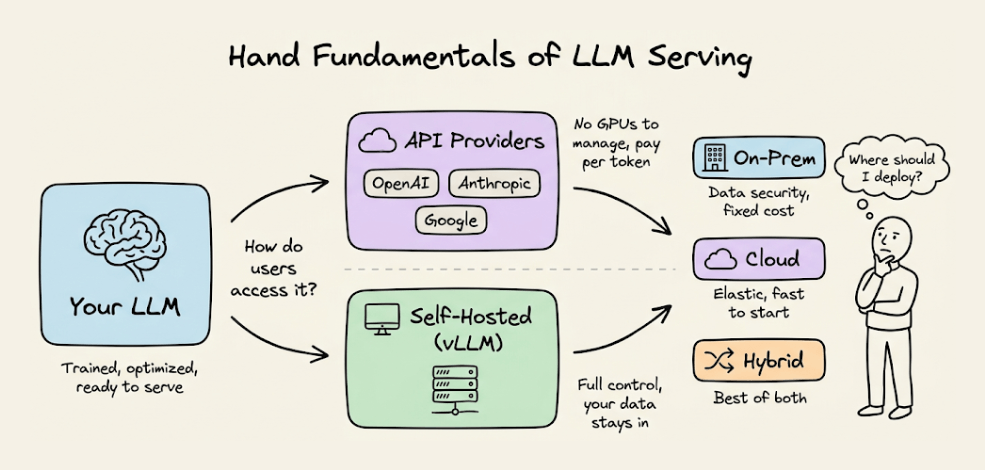
It covers how to actually make a language model accessible as a service: API-based providers vs. self-hosted inference, deployment topology decisions (on-prem, cloud, hybrid), serving with vLLM, and the practical trade-offs that determine how your LLM runs in production.

Read Part 14 of the full LLMOps course here →


Why care?

Optimizing inference (the previous chapter) is about making a single model run faster. Serving is about making that model reliably available to users.

These are different problems. You can have the most optimized inference stack in the world, but if your serving layer cannot handle concurrent users, if cold starts block requests, if you have no strategy for scaling up and down, none of that optimization matters in practice.

The serving layer is where engineering decisions directly translate into user experience and cost. Choosing between API providers and self-hosting changes your cost structure, latency profile, and data privacy posture. Choosing between on-prem and cloud changes your operational burden and scaling flexibility.

This chapter gives you the conceptual framework to make these decisions thoughtfully, along with hands-on experience serving models with vLLM.

Over to you: What would you like to learn in the LLMOps course?

hands-on

Build a 100% local MCP server and client

Claude Desktop and Cursor rely on external LLMs to leverage MCP capabilities.

When building enterprise-grade solutions, keeping your data on your own servers becomes critical.

This is where learning to build local MCP clients becomes essential.

Let’s learn that today by building a 100% local MCP server and client.

Stack:

  • Build a 100% local and secure MCP client using mcp-use.
  • Integrate the client with the Stagehand MCP server.
  • Use this setup to control and automate the browser.

A quick background before we get into the code.

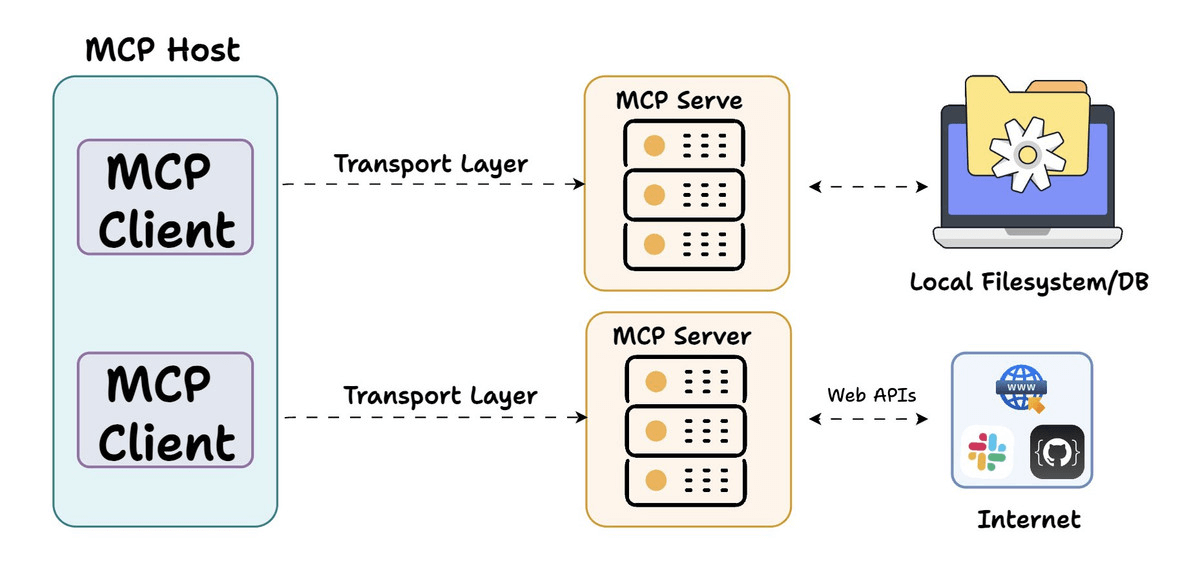
MCP follows a client-server architecture where:

  • Host (Agent/IDE) runs the MCP Client to communicate with MCP Servers.
  • MCP Servers expose tools that can perform various actions.

This architecture enables secure and standardized AI tool integration.

With this understanding in mind, let's start building our own MCP servers and clients.

1️⃣ Build a simple MCP server

First, we create a simple MCP server using FastMCP with a tool that adds two numbers.

  • Decorate the method with the specified decorator.
  • Add a docstring to the method.
  • Implement the functionality.

Then create a configuration file that tells any client how to connect to this server.

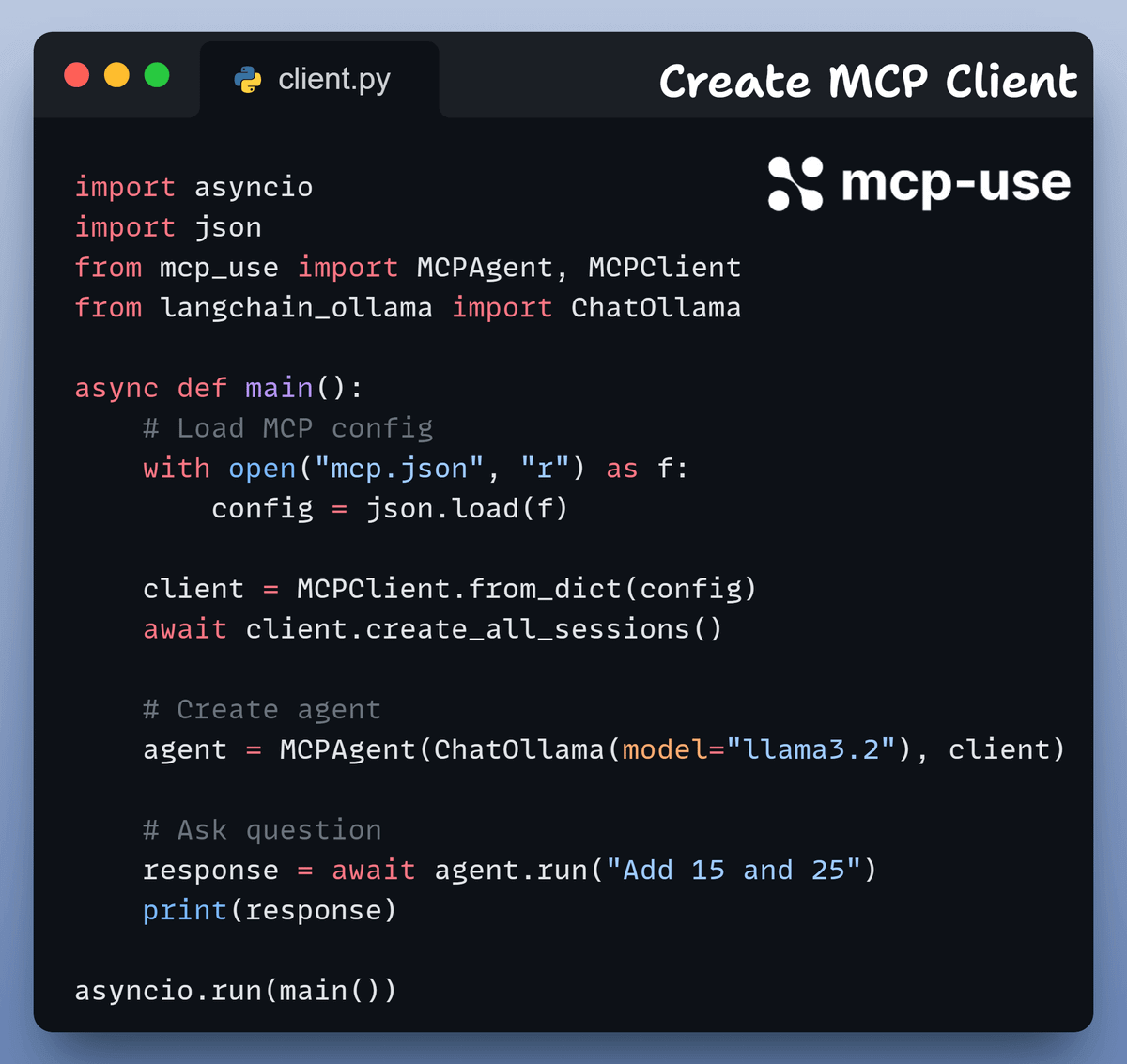
2️⃣ Create MCP Client

Next, we build a client using mcp-use, powered by locally running LLMs.

It's completely secure and can run on your machine.

Let's integrate the MCP client and server we just created.

Here's a Streamlit UI for better accessibility that wraps the client we created above.

For didactic purposes, we're starting with a very simple server.

Now, let's make this more practical. We're going to build a browser automation MCP server using Stagehand.

With this, we can navigate websites, click buttons, fill out forms, and extract data using natural language commands (full code is in the GitHub repo shared later).

Here is the implementation:

Next, let's interact with the Stagehand MCP server.

In the video below, when asked to find the cheapest flight from one city to another:

  • It navigated to Google.
  • Typed in the query.
  • Scraped the relevant information.
  • Returned the results to the agent to generate a response.

That was simple, wasn’t it?

We used mcp-use because you can use it to connect any LLMs to MCP servers & create local MCP clients easily.

  • Compatible with Ollama & LangChain
  • Stream Agent output async
  • Built-in debugging mode, etc

Find the GitHub Repo here →

Find the code for this project on GitHub here →
Agents

[RECAP] A mini crash course on AI Agents!

Some time back, we released a free mini crash course on building AI Agents:

This is a good starting point for anyone to learn about Agents and use them in real-world projects.

It covers:

  • What is an AI Agent
  • Connecting Agents to tools
  • Overview of MCP
  • Replacing tools with MCP servers
  • Setting up observability and tracing

Everything is done with a 100% open-source tool stack.

You can find the entire code in this GitHub repo →

THAT'S A WRAP

NO-FLUFF RESOURCES TO...

Succeed in AI Engineering roles

All businesses care about impact. That’s it!

  • Can you reduce costs?
  • Drive revenue?
  • Can you scale ML models?
  • Predict trends before they happen?

We have discussed several other topics (with implementations) in the past that align with such topics.

Here are some of them:

All these resources will help you cultivate key skills that businesses and companies care about the most.

Partner with US

ADVERTISE TO 900k+ AI Professionals

Our newsletter puts your products and services directly in front of an audience that matters, including thousands of leaders, senior data scientists, machine learning engineers, data analysts, etc., around the world.

Get in touch today by replying to this email.

Today’s email was brought to you by Avi Chawla and Akshay Pachaar.

Update your profile | Unsubscribe

Looking for more? Unlock our premium DS/ML resources.

© 2026 Daily Dose of Data Science

Daily Dose of Data Science

Daily no-fluff issues that help you succeed and stay relevant in DS/ML roles.

Read more from Daily Dose of Data Science

Master Full-stack AI Engineering In today's newsletter: The operating system for AI research labs! Why agent crashes are nothing like database crashes. [Hands-on] Deploy a Qwen 3 Agentic RAG. TODAY'S ISSUE OPEN-SOURCE The operating system for AI research labs! Transformer Lab is an open-source ML platform that orchestrates GPUs across any cloud and runs any training or eval workflow you define: supports LoRA, QLoRA, DPO, ORPO, SIMPO use it from a GUI, CLI, or agent skill. works with MLX,...

Master Full-stack AI Engineering In today's newsletter: Fine-tune any LLM directly from Claude! Speculative decoding in LLMs. tSNE Projections can be misleading. TODAY'S ISSUE fine-tuning Fine-tune any LLM directly from Claude! We built a Hugging Face fine-tuning studio that lets you fine-tune any LLM directly from Claude: The app connects to the HF Hub for model and dataset search. It handles chat template formatting for the training data, and lets you configure LoRA rank, quantization,...

Master Full-stack AI Engineering In today's newsletter: Markov decision processes and value functions in RL. How LLM inference works internally. TODAY'S ISSUE AI engineering Markov decision processes and value functions in RL Last week, we launched a hands-on course series on reinforcement learning. Part 2 is now available, and you can read it here → Reinforcement learning nanodegree part 2 Part 1 gave you the RL interaction loop and the exploration-exploitation tradeoff through bandits, and...